Case Study: How an environmental non-profit saved $5,000 and 40 hours a year and built a system that will scale with them as they grow
$5,000/year saved
40 staff hours/year saved
Communication errors reduced
The Context
An environmental non-profit had grown quickly over the last 5 years. They had about 30 full-time employees, multiple teams, and offices in different states across the country.
The Need
The organization was planning to grow, but their payroll and grant reporting process didn't scale well. There was a lot of manual data entry, which meant that it would take more time as more employees and grant funding sources were added to their system.
The Before
The existing process was built lovingly by Elizabeth, the organization's Operations Director. It split each payroll expense across over 30 different funding sources and recorded a single, clean journal entry for each pay period.
But it involved copying data manually between:
- QuickBooks Time (for time tracking)
- Gusto (for payroll)
- Google Sheets (for reporting)
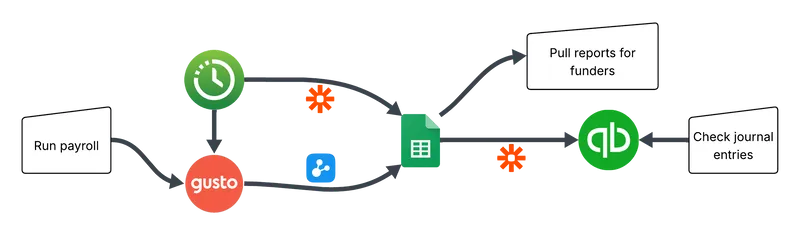
- and QuickBooks Online (for the final journal entry)
With 30 employees and 30 funding sources, the process to create a journal entry took about 5 hours a month, and adding new employees and funding sources in the future would scale the time required exponentially.
To offload the process, the organization was paying about $500/month, but it still required Elizabeth's occassional involvement, since adding new employees or funding sources meant back-and-forth to keep reports accurate. Consolidating reports for funders took Elizabeth an additional 1-2 hours/month, something she would love to do a lot less of.
Reaching Out
The organization had explored other software solutions but nothing seemed to fit their needs.
I worked with Elizabeth to find out how she wanted the process to work, in an ideal world, and then designed specific automations around that. My proposal was targeted and focused on solving the specific problems they had without making them change tools or processes that were already working for them, while allowing them to change the parts that weren't working as well. Like all my projects, it also came with 12 months of support included, to make sure the organization could integrate the new automation into how their organization actually ran day-to-day and week-to-week.
The Process
I took two hours to walk through Elizabeth's current process and map out all the outputs they needed from the automated version.
We discovered that the manual Google Sheet Elizabeth had been building was also functioning as a reporting tool to show to funders. We decided to keep the Google Sheet report as part of the process, since it was still helpful to show to funders, and automate the manual data entry both into and out of the Google Sheet.
The organization granted me access to their systems and signed up for a Zapier account (with the non-profit discount) so that I could start writing the automations needed. Because Gusto didn't integrate with Zapier, they also signed up for a free Dataddo account, which I configured for them, to get their Gusto data out into Google Sheets.
Over the course of the project, Elizabeth spent less than 5 hours answering my specific questions about how she would like the new process to work, how often they ran payroll, how they handled off-cycle payroll, etc.
Elizabeth and I had a hand-off meeting with documented instructions on what the new automation required to keep running (for example, keep project and employee names the same between systems, or else update a matching table to show the automation which employees and projects matched with which ones).
After the hand-off meeting, some issues came up with infrequent but normal payroll situations, like an employee forgetting to put their timesheets in or using vacation hours for an entire pay period. Since support included 12 months of fixes, I was able to fix the automation to work for those situations as well at no extra charge to the organization.
After
After the automation was complete, the organization was saving over $5000/year, and Elizabeth had gained 3+ hours of her time back each month (or one full working week each year). Plus she no longer had to coordinate the back-and-forth or manually consolidate the reports.
The new automation ran automatically whenever payroll was run. If additional information was needed (for example, if time sheets were missing), it sent Elizabeth an email to let her know what to fix and then automatically tried again the next day; no need for back-and-forth to coordinate manual data entry, and missing data was automatically emailed to her when it was needed.
The automated report also allowed her to automatically pull reports for any consolidated time period; no need to manually combine reports when funders ask for them. Pulling reports now takes 10 seconds of inputting and 10-15 seconds of waiting for each report to generate, whereas before it would take 15-20 minutes to put each report together manually.
They had a Zapier automation subscription (with a non-profit discount) that could scale as the organization grew and could handle additional automation projects in the future.
Takeaway
If your organization is spending hours each month inputting data manually across multiple platforms or spending money on a solution that isn't quite working out how you wanted, I would love to help you with it.
To get started, book a dicovery call so we can talk about your organization's specific situation and how you may be able to automate the admin work that's dragging you down.